Unlocking Creativity: A Practical Guide to Using Candy Bar Clip Art - 100 Colors
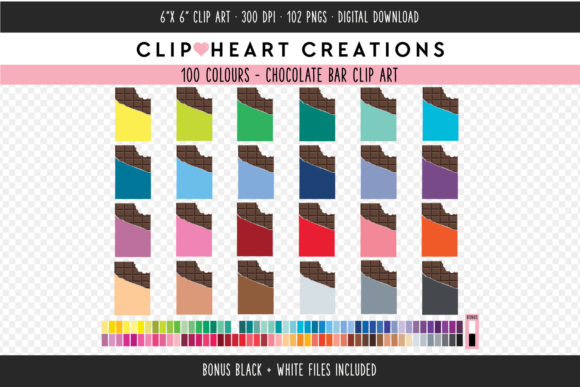
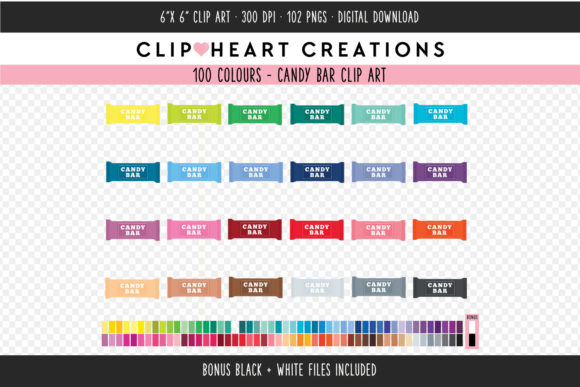
Few things spark immediate joy in a design project quite like the vibrant, nostalgic appeal of candy. Whether you are crafting custom wedding favors, designing packaging for a small bakery business, or creating engaging educational materials for a classroom, visual elements set the tone before a single word is read. This is where Candy Bar Clip Art - 100 Colors becomes an invaluable asset. It offers a comprehensive library of 102 individual elements, providing a spectrum of hues that can match virtually any brand palette or party theme. However, possessing high-quality assets is only half the battle; knowing how to select, implement, and optimize them is what separates amateur outputs from professional-grade results.
Many creators, from seasoned graphic designers to enthusiastic hobbyists, often rush into downloading and using clip art without considering the technical nuances that dictate final quality. While this collection is robust—featuring high-resolution 300 DPI files saved separately in PNG format with transparent backgrounds—misunderstanding how to leverage these specifications can lead to frustrating outcomes. Let's explore common pitfalls users encounter when working with extensive color collections and how to avoid them to ensure your projects look polished and professional.
The Resolution Trap: Why Screen Quality Doesn't Equal Print Quality
One of the most frequent mistakes beginners make is assuming that an image looking crisp on their computer monitor will automatically translate well to physical media. You might be designing gift tags, cupcake toppers, or fabric prints where clarity is non-negotiable. If you pull images from free online sources that are optimized for web use (typically 72 DPI), they will appear pixelated and blurry once printed. This collection specifically addresses that issue by offering files at 300 DPI, which is the industry standard for high-quality printing.
However, simply having 300 DPI files isn't enough if you stretch them beyond their intended dimensions. Each file in this set is sized at 6 x 6 inches. If you attempt to enlarge a 6x6 image to cover a full poster board, you will degrade the resolution. The corrective approach here is to respect the native size of the assets. For items like stickers, invitations, and gift wrap, the 6x6 dimension is usually perfect or easily scalable down. If you need larger graphics, consider tiling the pattern or using the elements as repeated motifs rather than stretching a single instance. Always check your print settings to ensure the software is not automatically resampling the image to a lower quality.
Navigating the Overwhelm of 100 Color Options
Having access to 100 distinct colors is a tremendous advantage, but it can also lead to "choice paralysis" or inconsistent branding. A common error among small business owners and marketers is selecting colors based solely on personal preference in the moment, rather than adhering to a cohesive visual identity. You might choose a bright neon pink for one batch of cupcake toppers and a muted pastel pink for another, confusing your customers and diluting your brand recognition.
To avoid this, treat the Candy Bar Clip Art - 100 Colors collection as a palette to be curated, not a buffet to be raided randomly. Before opening the zip folder, define your color scheme. Are you aiming for a vintage aesthetic? Stick to the muted tones within the collection. Is your goal a modern, energetic vibe? Focus on the saturated primaries. By pre-selecting 3 to 5 specific shades from the 102 available elements and sticking to them across all your materials—from web graphics to physical fabric applications—you create a unified look that feels intentional and professional. This discipline transforms a large asset library from a chaotic mess into a streamlined design system.
Understanding File Formats and Transparency
The utility of this collection lies heavily in its PNG format with transparent backgrounds. This feature allows you to layer candy illustrations over colored paper, textured fabrics, or complex website backgrounds without unsightly white boxes surrounding the images. Yet, a surprising number of users inadvertently ruin this benefit by saving or converting files incorrectly. For instance, pasting a PNG into a program that defaults to JPEG export will fill the transparent areas with white, defeating the purpose of the high-quality source file.
Furthermore, some users overlook the fact that all files are compressed into one zip folder. Attempting to use the images directly from the compressed archive without extracting them first can cause software errors or slow down your workflow. The best practice is to immediately unzip the folder upon download and organize the files into subfolders by color family or hue intensity. This not only speeds up your design process but also ensures that your software reads the transparency data correctly. When working on web graphics, ensure your export settings preserve the alpha channel (transparency) to maintain that clean, floating look essential for modern UI design.
Licensing and Commercial Viability
While this article focuses on the technical and creative aspects, it is crucial to address the legal side of using digital assets, especially for entrepreneurs and freelancers. A significant misunderstanding in the creator economy involves assuming that purchasing a clip art pack grants unlimited rights without checking specific terms. While this collection notes that watermarks are removed once purchased, indicating a ready-to-use product, you must verify the specific license agreement regarding commercial use. Can you use these images on products you intend to sell, such as printed fabric or packaged goods? Or are they restricted to personal projects like scrapbooking and home decor?
Ignoring these details can lead to costly legal issues or the removal of your products from marketplaces. The prudent path is to read the license file included in the download thoroughly. If the terms allow for commercial use, fantastic—you can confidently apply these designs to client projects or inventory. If there are restrictions, perhaps on the number of physical items sold, plan your production run accordingly. Treating intellectual property with respect protects your business reputation and ensures long-term sustainability.
Maximizing Versatility Across Mediums
The true power of this 102-element collection is its adaptability. Users often pigeonhole clip art into a single use case, such as digital invitations, forgetting its potential elsewhere. Because these files are high resolution, they are equally suited for physical crafts and digital interfaces. Consider using the candy bar graphics as repeating patterns for custom wrapping paper by arranging them in a grid within your design software. Alternatively, educators can utilize the distinct colors to teach color theory or sorting skills, printing the images onto cardstock for durable classroom manipulatives.
For those working with fabric, remember that the 300 DPI resolution supports iron-on transfers and direct-to-garment printing. A common oversight here is failing to mirror the image before printing for transfer projects, resulting in reversed text or asymmetrical designs. Always double-check your orientation settings. Similarly, when creating web graphics, optimize the file size for faster loading times without sacrificing the visual fidelity provided by the original high-res source. Balancing quality with performance is key to a good user experience online.
In conclusion, Candy Bar Clip Art - 100 Colors offers a rich resource for anyone looking to add a splash of sweetness to their creative endeavors. By respecting resolution limits, curating your color choices deliberately, managing file formats correctly, and understanding licensing terms, you can avoid common pitfalls that plague many DIY projects. Whether you are a blogger enhancing a post, a small business owner packaging goods, or a parent making birthday decorations, these practical steps ensure that the final result is as delightful and high-quality as the inspiration behind it. Embrace the variety this collection offers, but wield it with the precision of a pro to truly make your work stand out.